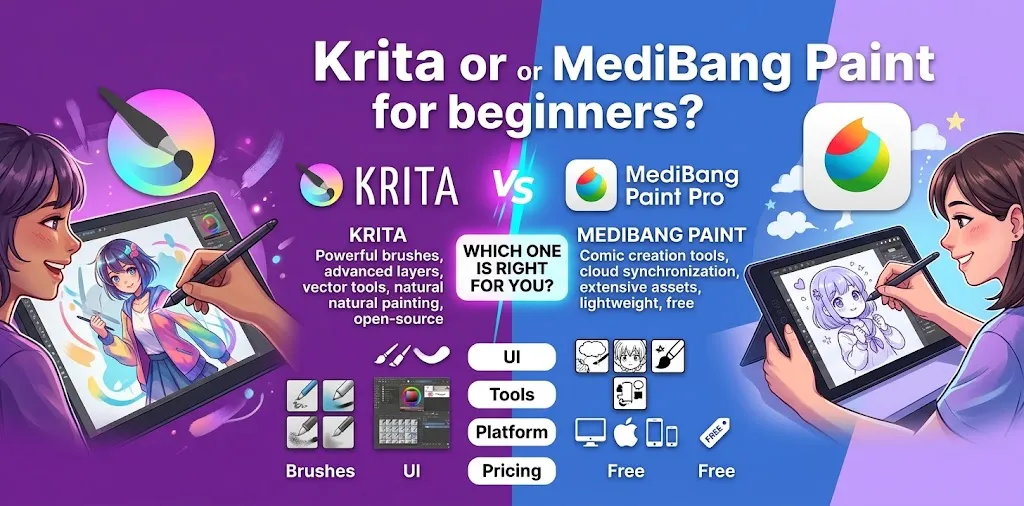
If you are new to digital art, both Krita and MediBang Paint are strong free options, but they are designed with slightly different priorities. Krita is the better choice for beginners who want to learn digital painting, illustration, concept art, or animation. MediBang Paint is especially appealing to beginners focused on manga, comics, simple illustrations, and working across multiple devices. Your art style and preferred workflow should decide the winner.
Krita vs. MediBang Paint: Which Is Better for Beginners?
For most beginners, Krita is the better long-term choice because it offers a broad set of painting tools, customizable brushes, brush stabilization, vector tools, layer controls, drawing assistants, and animation features. Krita is also free and open source.
MediBang Paint is easier to recommend if your main goal is manga and comic creation. It focuses heavily on comic panels, screentones, fonts, cloud storage, cross-device work, and collaboration.
| Category | Krita | MediBang Paint |
|---|---|---|
| Beginner digital painting | Excellent | Good |
| Manga and comics | Excellent | Excellent |
| Illustration | Excellent | Good |
| Animation | Strong | More limited |
| Brush customization | Excellent | Good |
| Brush stabilization | Strong | Good |
| Comic panels | Strong | Excellent |
| Screentones and comic materials | Good | Excellent |
| Cloud workflow | Not its main focus | Excellent |
| Cross-device workflow | More limited | Excellent |
| Learning curve | Moderate | Easier for many comic beginners |
| Free access | Free and open source | Free version available |
| Best overall for beginners | Krita | Best for comic-focused beginners |
The important point is that “better” depends on what you want to draw. A beginner making character paintings may have a very different experience from someone creating their first manga page.
What Makes Krita Good for Beginners?
Krita is a digital painting program built around illustration and creative painting. Its feature set is much broader than you might expect from free software.
It includes a large selection of brushes, multiple brush engines, brush stabilization options, customizable workspaces, vector tools, drawing assistants, layer management, and 2D animation tools.
That can sound intimidating, but it also gives you room to grow.
A beginner can start with just a few basic tools:
- Brush
- Eraser
- Layers
- Color selector
- Transform tool
- Undo
- Stabilizer
You do not need to understand every panel when you first open Krita.
Krita is especially good for digital painting
If you want to learn how to paint portraits, landscapes, characters, environments, or stylized illustrations, Krita has a strong advantage.
Its brush engines let you change how brushes behave, while its stabilizers can help smooth shaky strokes. Krita also includes drawing assistants for things such as perspective and straight lines.
That makes it useful when you are learning both basic drawing and more advanced digital techniques.
Krita gives beginners room to grow
One common problem with beginner-friendly software is outgrowing it after a few months.
Krita is less likely to create that problem.
You can begin with simple sketches and gradually move into:
- Detailed digital paintings
- Character design
- Concept art
- Comic artwork
- Texture creation
- Vector elements
- Animation
- More advanced layer workflows
Krita’s animation workspace supports layers, timelines, onion skinning, playback controls, and animation exporting.
So even if you start as a complete beginner, the software can continue to support more advanced projects.
What Makes MediBang Paint Good for Beginners?
MediBang Paint takes a different approach. It is designed for digital painting and comic creation, with a particularly strong focus on manga and comic workflows.
The software includes brushes, layers, snap guides, comic panel creation, page management, fonts, premade tones and backgrounds, and cloud features.
That combination can make MediBang Paint feel approachable if your main goal is to create comics rather than learn every aspect of digital painting.
MediBang Paint is excellent for manga and comics
Suppose your goal is to draw a character, put that character into a comic panel, add dialogue, and build several pages.
MediBang Paint has tools specifically suited to that workflow.
Its comic features include panel creation and page management, while its materials include premade tones, backgrounds, and fonts.
This means a beginner can spend less time building comic-production tools from scratch.
MediBang Paint works well across devices
Another major advantage is its cross-device approach.
MediBang supports desktop computers, iPad, iPhone, and Android devices. Its cloud features can allow you to access work across devices and synchronize certain settings such as brushes and palettes.
For example, a beginner could sketch on a tablet and later continue working on a computer.
Cloud features require an account and internet access, so this workflow is not completely offline.
Krita vs. MediBang Paint for Drawing
If your main goal is drawing and illustration, Krita has the stronger overall feature set.
Krita offers extensive brush customization and multiple brush engines, along with stabilizers and drawing assistants.
MediBang Paint is still capable of everyday drawing. It offers a variety of brushes for sketching, inking, coloring, and comic work.
The difference is less about whether either program can draw and more about what happens when your projects become more demanding.
Choose Krita if: you want painting, illustration, character art, or concept art.
Choose MediBang if: you mainly want simple illustrations, line art, manga, or comics.
Krita vs. MediBang Paint for Manga
For manga and comic beginners, the decision becomes much closer.
MediBang Paint has a clear advantage in dedicated comic-production features. It offers comic panel creation, page management, screentones, backgrounds, fonts, and collaboration features.
Krita can also handle comic artwork. Its vector tools can be used for comic panels and text, and its layer system gives artists considerable control over their artwork.
So the choice comes down to workflow.
If you want a straightforward comic-focused environment, MediBang Paint is a strong beginner option.
If you want manga plus broader digital painting capabilities, Krita may be the better long-term choice.
Which Has the Easier Learning Curve?
MediBang Paint can feel easier at first if you are specifically interested in comics because many of its tools are closely tied to that workflow.
Krita can feel more complicated because it exposes you to a larger set of painting and production tools.
That does not mean Krita is difficult to learn. It simply means there is more available to learn.
For a beginner, the best approach is to avoid trying to master the entire program at once.
Start with:
- Canvas creation
- Brush selection
- Brush size and opacity
- Layers
- Eraser
- Undo and redo
- Selection tools
- Transform tools
- Saving and exporting
Once those become comfortable, learn more advanced features as your projects require them.
Which Has Better Brushes?
Both programs offer a variety of brushes, but they approach customization differently.
Krita is particularly strong for artists who want to experiment with brush behavior. Its brush engines provide extensive customization and control.
MediBang Paint focuses on a collection of practical brushes for sketching, inking, coloring, and comic work.
For a beginner, however, having hundreds of brushes is not automatically better.
A simple pencil, ink brush, soft brush, and hard brush are enough to start learning.
Your drawing skills will matter much more than the number of brushes installed.
Which Is Better for Animation?
Krita is the clear choice between these two for beginners who want to learn 2D animation.
Krita has a dedicated animation workspace with a timeline, onion skinning, playback controls, frame management, and animation exporting.
MediBang Paint is much more focused on illustration and comic creation.
So if animation is part of your long-term plan, starting with Krita makes more sense.
Which Is Better for Working Across Devices?
MediBang Paint has the stronger advantage here.
MediBang supports Windows, macOS, iPad, iPhone, and Android, and its cloud system is designed to let users access work across devices. It can also synchronize brushes, palettes, and other settings.
For someone who owns a tablet and computer, that can be useful.
For example, imagine you draw during a school break on an Android tablet and want to continue the same project later on a Windows PC. MediBang’s cloud workflow is designed around this type of use.
If you mostly work on one computer, this advantage may not matter much.
Which One Is Better for a Beginner’s Computer?
If your computer is older or has limited resources, MediBang Paint’s lightweight design may be attractive.
Krita can handle serious artwork, but larger canvases, many layers, complex brushes, and animation projects can place greater demands on your computer.
The practical lesson is simple: your canvas size and project complexity can matter as much as the software itself.
If either program feels slow, try a smaller canvas, fewer active layers, or simpler brushes before assuming the software is unsuitable.
Is Krita Really Free?
Yes. Krita is free and open-source software, and it can be used for personal and commercial creative work.
That makes Krita especially attractive for beginners who want to learn digital art without paying for a recurring software subscription.
You can start learning with the same core program you may later use for more advanced artwork.
Is MediBang Paint Free?
MediBang Paint offers a free version of its painting and comic software. Optional premium services provide additional materials, filters, cloud storage, and other features.
This means beginners can start without paying, while artists who want additional cloud and material features have paid options available.
The free version is enough to evaluate whether the program fits your workflow.
Which Should You Choose Based on Your Art Goals?
Your intended use is probably the easiest way to make the decision.
| If you want to… | Better choice |
|---|---|
| Learn digital painting | Krita |
| Draw character illustrations | Krita |
| Paint landscapes | Krita |
| Learn 2D animation | Krita |
| Create manga | MediBang Paint |
| Create multi-page comics | MediBang Paint |
| Use lots of comic materials | MediBang Paint |
| Work between phone, tablet, and PC | MediBang Paint |
| Experiment with advanced brushes | Krita |
| Use drawing assistants and perspective tools | Krita |
| Start with a comic-focused workflow | MediBang Paint |
| Learn one program for broad digital art skills | Krita |
Two Beginner Scenarios
You want to become a digital illustrator
Imagine you are starting with no digital art experience. Your goal is to draw characters, color them, create backgrounds, and eventually experiment with animation.
Krita is the better starting point.
You may spend a little more time learning the interface, but the software gives you tools that remain useful as your skills improve.
You want to make your own manga
Now imagine your goal is to draw characters, create panels, add speech bubbles and screentones, and eventually produce complete comic pages.
MediBang Paint may be the better starting point.
Its comic-oriented features reduce the amount of setup between opening the program and creating a manga page.
What Should You Learn First in Either Program?
Do not start by downloading dozens of brushes or watching advanced tutorials.
Build a basic digital art workflow first.
Practice these skills in order:
- Create a new canvas.
- Learn how brush size and opacity work.
- Create and rename layers.
- Sketch using a simple brush.
- Use a separate layer for clean line art.
- Add flat colors underneath or above your line art as appropriate.
- Use selections and the transform tool.
- Save the editable project file.
- Export a PNG or JPG when you finish.
- Practice the same workflow on several small drawings.
This will teach you more than spending hours exploring every menu.
Common Beginner Mistakes When Choosing Digital Art Software
The biggest mistake is choosing software because someone says it is “professional.”
A professional-looking feature list does not automatically make a program better for your first month of digital drawing.
Another mistake is switching programs constantly.
If you spend one week learning Krita, then switch to MediBang, then try three other programs, you may spend more time learning interfaces than learning art.
Pick the program that matches your goal and stick with it long enough to become comfortable.
You also do not need expensive brushes, plugins, or a huge library of materials to start. Basic drawing skills, practice, and a comfortable tablet setup are more important.
Final Verdict: Krita or MediBang Paint for Beginners?
Krita is the better all-around choice for most beginners, especially if you want to learn digital painting, illustration, character art, concept art, or animation. It is free, open source, powerful, and flexible enough to support you as your skills improve.
MediBang Paint is the better specialized choice for beginners who mainly want to make manga and comics, particularly if cross-device access, cloud features, comic materials, and collaboration matter to you.
If you are still unsure, start with Krita unless you already know that manga and comic creation is your main goal. Give yourself a few days to learn the basic tools before deciding whether you need something different.
Frequently Asked Questions
Is Krita easier than MediBang Paint for beginners?
Not necessarily. MediBang Paint can feel simpler for beginners who mainly want to create manga and comics, while Krita offers more advanced painting tools that can make its interface feel more complex. The easier option depends on what you plan to draw.
Is MediBang Paint better than Krita for manga?
MediBang Paint has a strong advantage for beginners who want a dedicated comic workflow because it includes comic panels, page management, screentones, backgrounds, and fonts. Krita is also capable of comic creation and may be a better choice if you want manga skills alongside broader digital painting and illustration skills.
Should I learn Krita or MediBang Paint first?
Choose Krita if you want broad digital art skills, including painting, illustration, and animation. Choose MediBang Paint first if your main goal is manga, comics, and a workflow that moves easily between devices.
Final Takeaway
For most new digital artists, Krita is the safer first choice because it gives you a broad set of tools without requiring a paid subscription. If your main interest is manga or comic creation, MediBang Paint may fit your workflow better.
The best way to decide is to create the same small drawing in both programs. Use the one that feels more comfortable and helps you spend more time drawing and less time fighting the interface.